
























When a list of identifiers arrives in mixed order and mixed capitalization, clean it before turning it into one line. This workflow uses text-sorter to keep the first spelling of each case-insensitive duplicate, then uses comma-separator when a compact list is needed. The result is predictable, easy to inspect, and suitable for a list whose commas are separators only.
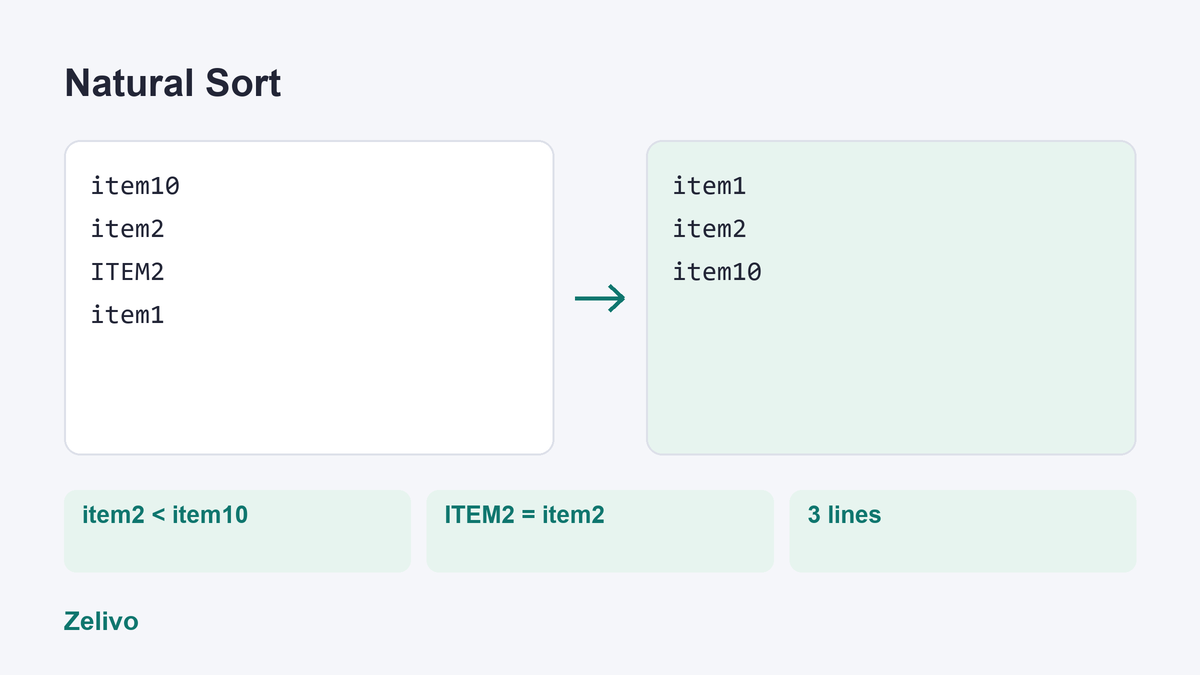
Paste the list in its original order
Start with one identifier per line and keep the original order and capitalization. In the input below, item2 and ITEM2 differ only in case. Leave both as written. Their order matters because duplicate removal keeps the first occurrence, which may be the spelling your next step needs. Paste all four lines into Text Sorter.
item10
item2
ITEM2
item1
Choose natural case-insensitive ascending sort and enable duplicate removal. Deduplication happens before sorting, and the first spelling encountered survives. Because item2 appears before ITEM2, the surviving spelling is item2. Natural ordering also compares the identifiers in a human-friendly way, so item2 comes before item10 rather than after it as a simple character-by-character comparison might suggest.
Verify the order before joining
The expected output is the following three-line result. It contains item1, item2 and item10, with the duplicate removed. Reproduce the check by comparing each output line with the expected sequence: the first line is item1, the second is the surviving item2 spelling, and the third is item10. The line count should be three.
item1
item2
item10
After verification, you can pass these clean lines to comma-separator. Paste one item per line, choose a comma, and join them without changing the order. The resulting single line is item1,item2,item10. Count two commas: each comma sits between adjacent items, and there is no comma after the final item. This is a separator operation, not CSV quoting.
Handle empty rows and embedded commas
Reversing is not the same as requesting a descending natural sort. Reverse flips the existing input sequence, so it should not be used when you need descending order by value. Also, outer whitespace is trimmed for the whole input, while internal empty rows remain present unless you remove them manually. Duplicate removal can at most deduplicate identical blank rows.
Use comma-separator only when commas are separators and entries themselves contain no comma. It joins lines as-is and does not quote CSV fields. If an entry contains a comma, the output can no longer be interpreted safely as a simple comma-delimited list. For this guide’s clean sample, the output remains exactly item1,item2,item10.
Checks before copying the list
- Confirm natural case-insensitive ascending sort is selected.
- Confirm duplicates were removed before sorting and the first spelling survives.
- Confirm reversal was not mistaken for descending sort, and comma joining produced item1,item2,item10.
